

Notion is great for keeping notes, documents, and projects in one place, but developers may want more control over where their data lives and how their workspace works. Self-hosted alternatives give you the freedom to customise your setup, keep your data on your own infrastructure, and avoid being tied to a single platform. Here are some of the best self-hosted Notion alternatives for developers to consider.
What to Look for in a Self Hosted Notion Alternative
Common features to consider:
Not every Notion alternative covers the same ground. Before evaluating tools, be clear about which capabilities your team actually uses.
Must-haves for most teams:
- Rich text editing with block-based structure (pages, headings, callouts, toggles)
- Nested pages or hierarchical document organization
- Real-time or near-real-time collaboration
- Role-based access control (read, comment, edit, admin)
- Data export in open formats (Markdown, JSON, CSV)
- Active maintenance and a clear open-source license
Nice-to-haves depending on your use case:
- Database views (table, kanban, calendar, gallery)
- Inline comments and threaded discussions
- API access for integrations
- Local-first or offline mode
- Built-in diagram or whiteboard support
- Self-hosted AI integration
Hosting Requirements: Docker, VPS, and Beyond
Most of the team-oriented tools in this list support Docker-based self-hosting, but deployment requirements vary. Logseq is different because it is primarily a local-first application rather than a conventional self-hosted server.
For a small team, a modest VPS can be enough, but the required CPU, memory, storage, and database resources vary considerably by application and workload. Check the deployment requirements for your chosen tool before provisioning a server.
As a rough starting point, teams with heavier workloads may want to provision more CPU and memory, then scale based on actual usage.
Kubernetes: If your organization already runs Kubernetes, check whether your chosen project's official documentation or community provides a supported Kubernetes deployment method.
AppFlowy: The Open-Source Notion Alternative Built for Teams
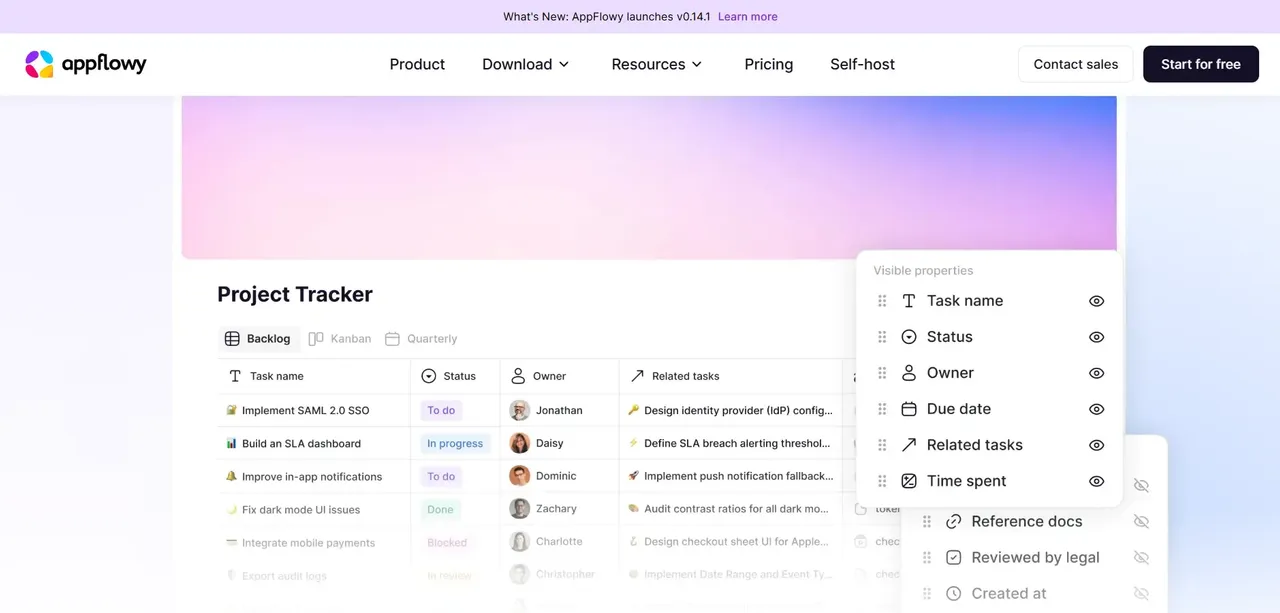
AppFlowy is one of the closest Notion-style options in this list. It replicates Notion's core interaction model: block-based pages, inline databases, kanban boards, calendar views, and a sidebar for navigation. The interface will feel immediately familiar to anyone who has used Notion.
AppFlowy is written in Rust and Flutter, which gives it strong performance characteristics and a native desktop client alongside the web version. The project remains actively developed, with regular releases. The AppFlowy project is licensed under AGPL-3.0. Because AGPL has specific requirements around modified versions, particularly for software offered over a network, organizations planning to modify or redistribute AppFlowy should review the license terms.
The AppFlowy desktop and mobile clients connect to your self-hosted instance by entering your server URL at login. No additional configuration is required on the client side.
AFFiNE: A Local-First Workspace You Can Fully Self Host
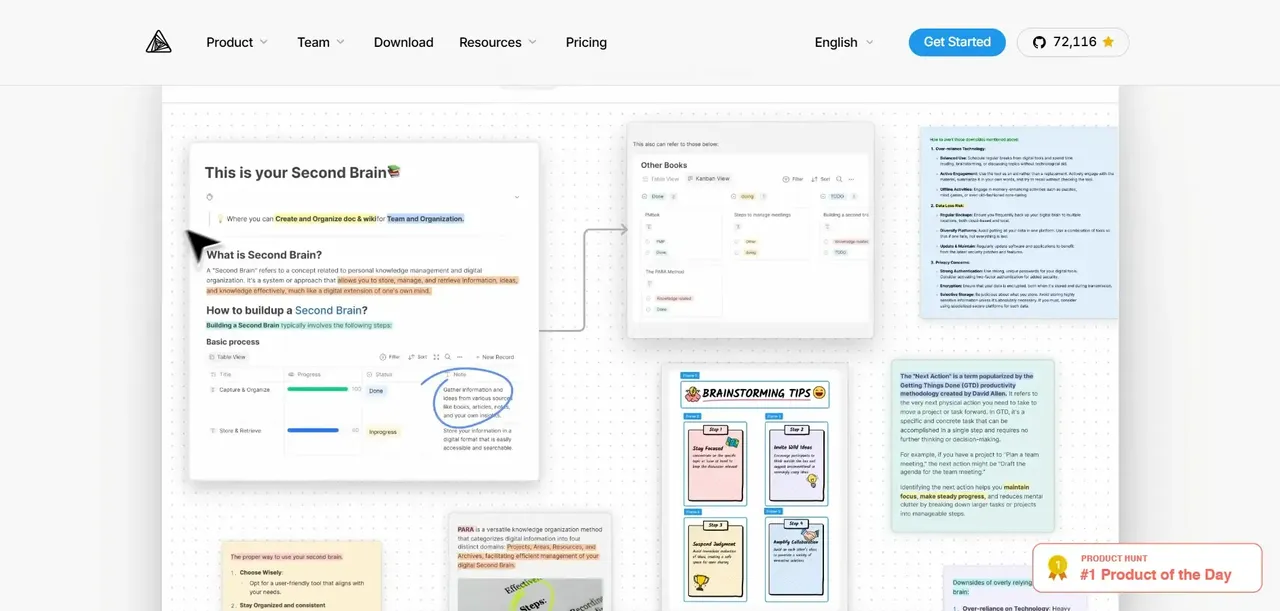
AFFiNE takes a different architectural approach. It is designed as a local-first application, meaning data is stored on the client device first and synced to the server. This gives it genuine offline capability, which AppFlowy's web-first architecture does not match.
AFFiNE combines a document editor, a whiteboard canvas, and a database layer in a single interface. The whiteboard sets AFFiNE apart from more traditional wiki-focused tools: you can embed pages, diagrams, and database blocks directly on an infinite canvas, which suits teams that think visually or run design-adjacent workflows. The document editor supports Markdown, rich text, and block-based editing consistent with Notion's model.
AFFiNE's editor and most of its codebase are MIT-licensed, while its backend is source-available under the AFFiNE Enterprise Edition license.
Outline: Self Hosted Knowledge Base for Engineering Teams
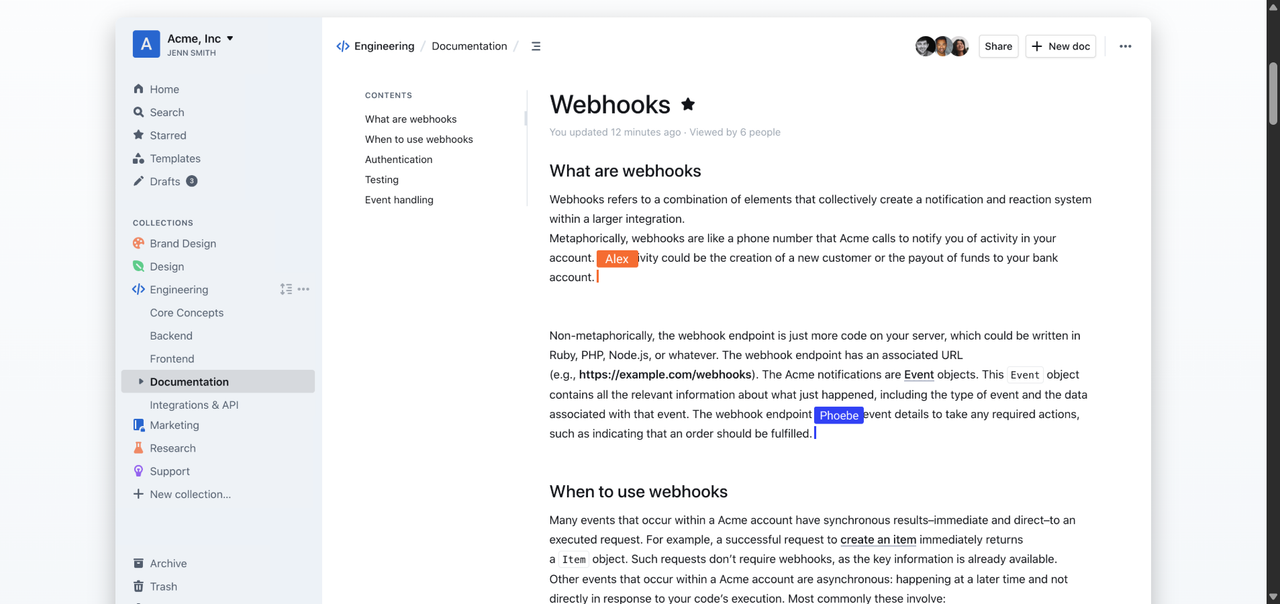
Outline is the most polished self-hosted knowledge base in this category. It is not trying to be a full Notion replacement: there are no kanban boards, no calendar views, and no personal task management. What it does, it does exceptionally well.
Outline is built for structured team documentation: engineering runbooks, onboarding guides, product specs, and internal wikis. The editor is fast, the search is excellent, and It supports groups and permissions for organizing access across a workspace. It supports Slack integration, GitHub integration, and a REST API for programmatic access.
The self-hosted version is licensed under BSL (Business Source License), which converts to Apache 2.0 after four years. This is worth understanding before you deploy: BSL is not a traditional open-source license, and there are restrictions on using the self-hosted version to offer a competing hosted service. Outline's Community Edition uses the Business Source License and has specific restrictions on commercial use cases such as selling, reselling, or offering Outline as a service. Review the license terms before deploying it in a commercial environment.
Logseq: A Local-First Alternative for Personal Knowledge Management
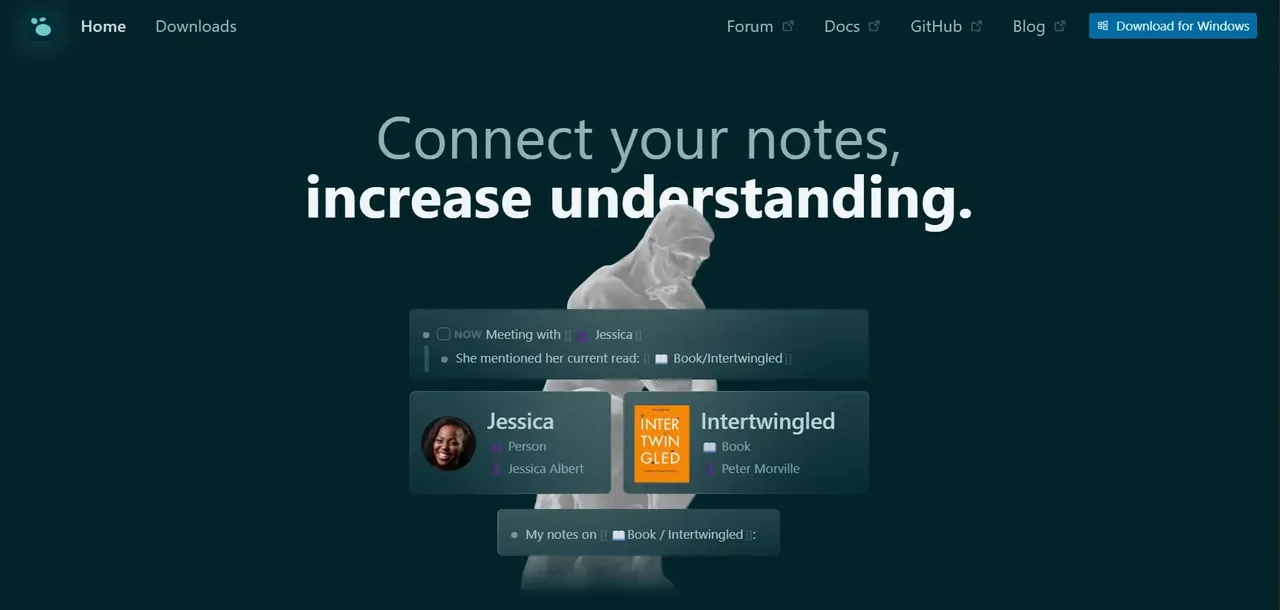
Logseq occupies a different niche from the other tools here. It is an outliner and graph-based knowledge tool, not a team wiki or project management platform. Every entry is a block, blocks are linked bidirectionally, and the graph view visualizes connections across your entire knowledge base.
Logseq stores data as plain Markdown and EDN files on your local filesystem. There is no database to manage, no server to configure for basic use. Logseq does not follow the conventional self-hosted-server model used by the other tools here. Its data is stored locally, and users can choose their own methods of synchronizing those files between devices.
This architecture is both its strength and its limitation. Your data is always in open, portable formats. You can read and edit your notes with any text editor. There is no vendor lock-in at the data layer. Logseq's collaboration model differs from the real-time multi-user editing offered by the team-focused tools in this list.”
Docmost: A Genuinely Open Source, Notion-Style Wiki for Teams
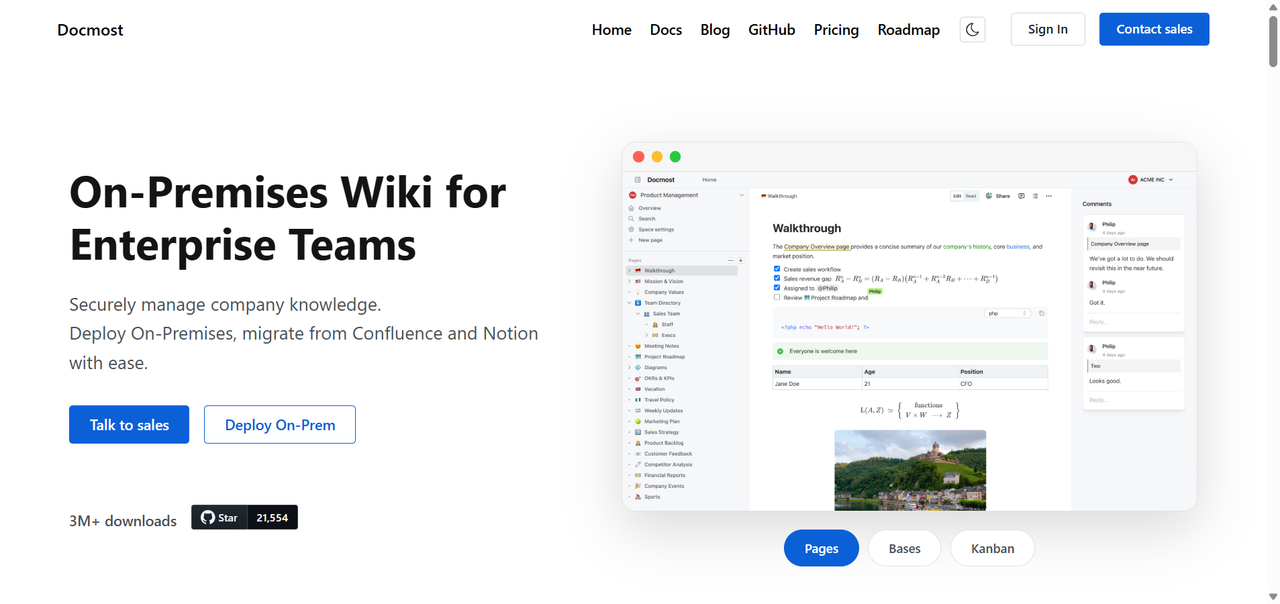
Docmost is a newer entrant in the self-hosted wiki space, but it has gained attention quickly for one reason: its core (AGPL-3.0) is straightforwardly open-source, covering the essential document and wiki functionality for free.
Docmost provides a block-based editor, nested pages, spaces (equivalent to Notion's workspaces), real-time collaboration, comments, and role-based permissions in the free community edition. It supports Markdown export and has a clean, modern interface that will feel familiar to Notion users.
Deployment is Docker-based with PostgreSQL and Redis as dependencies. The setup is comparable in complexity to Outline, and the documentation covers the essentials clearly. SSO (via OIDC), audit logs, and SCIM provisioning are available as a paid, rather than being part of the free community edition.
Head-to-Head Comparison: Which Self Hosted Notion Alternative Is Right for You?
Comparison Table: Features, Hosting Complexity, and Licensing
Feature | AppFlowy | AFFiNE | Outline | Logseq | Docmost |
|---|---|---|---|---|---|
Block-based editor | Yes | Yes | Yes | Outliner (blocks) | Yes |
Database / table views | Yes | Yes | No | Limited | Yes |
Kanban board | Yes | Yes | No | No | Yes |
Whiteboard / canvas | No | Yes | No | No | No |
Real-time collaboration | Yes | Yes | Yes | No | Yes |
Offline / local-first | Partial | Yes | No | Yes | No |
SSO support | Yes | Limited | Yes (OIDC, SAML) | No | Paid add-on (OIDC) |
REST API | Yes | Limited | Yes | No | Limited |
License | AGPL-3.0 | MIT / AGPL | BSL (Apache after 4yr) | AGPL-3.0 | AGPL-3.0 |
Hosting complexity | Medium | Medium-High | Medium | Low | Medium |
How to Deploy Your Self Hosted Notion Stack: A Step-by-Step Overview
For the server-based tools in this list, Docker Compose is a common deployment method. The exact services vary by application.
General deployment sequence:
- Provision a VPS (2 vCPUs, 4 GB RAM minimum for small teams)
- Install Docker and Docker Compose
- Clone the tool's official repository or pull its official Docker image
- Configure environment variables: database credentials, server URL, SMTP settings, storage configuration
- Run
docker compose up -dto start the stack - Verify the application is accessible on its internal port
- Configure your reverse proxy to route traffic to the application
Migrating from Notion to a Self Hosted Solution Without Losing Your Data
Notion provides a built-in export function that outputs your workspace as Markdown files with CSV exports for databases. This is your starting point for any migration.
Export from Notion:
- Go to Settings, then Export content
- Select Markdown and CSV as the format
- Include subpages in the export
- Download the ZIP archive
The export produces a folder structure that mirrors your Notion sidebar hierarchy. Pages become Markdown files. Databases become CSV files with a corresponding Markdown file for each database entry.
Import into your self-hosted tool:
- AppFlowy supports Markdown import directly. Database imports from CSV require manual recreation of the database schema, then importing rows.
- Outline has a Notion import feature that handles the Markdown structure reasonably well. Complex database views will not transfer.
- Docmost supports Markdown import. As with the others, database-heavy content requires the most manual work.
- AFFiNE supports Markdown import for documents. Database content requires manual reconstruction.
- Logseq reads Markdown files directly from your filesystem. Drop the exported files into your Logseq folder and they are immediately accessible.
Practical advice: Do not try to migrate everything at once. Start with your most-used documentation, verify it looks correct in the new tool, then migrate in batches. Archive old Notion content rather than deleting it until you have confirmed the migration is complete and the team is comfortable in the new environment.
FAQ
Is there a truly free self hosted Notion alternative?
Several tools in this list can be run on your own infrastructure without a software license fee, but their licensing models differ. AppFlowy and Docmost use AGPL-3.0, while AFFiNE uses MIT for most of its codebase and a separate source-available license for its backend. Logseq is primarily a local-first application rather than a conventional self-hosted server
How hard is it to self host AppFlowy compared to Outline?
Both use Docker Compose and require PostgreSQL. AppFlowy adds Minio or an S3-compatible object storage service to the stack, which introduces one more component to configure and maintain. Outline's stack is slightly simpler: PostgreSQL, Redis, and the application container. If you are comfortable with Docker and have deployed a multi-container application before, both are documented for Docker-based deployment, but the amount of setup and maintenance depends on your infrastructure and experience
Can I collaborate in real time on a self hosted Notion replacement?
Yes, with the right tool. AppFlowy, AFFiNE, Outline, and Docmost all support real-time collaborative editing. Multiple users can edit the same document simultaneously and see each other's changes. Logseq does not support real-time collaboration in the same way: it is a local-first personal tool, and shared editing requires workarounds like a shared Git repository or file sync service.\
What server specs do I need to self host a Notion alternative for a small team?
For a team of up to 20 users with moderate usage, a VPS with 2 vCPUs and 4 GB RAM is a workable starting point. Add a managed PostgreSQL instance or run the database in a separate container on the same host. For teams of 20 to 100 users, 4 vCPUs and 8 GB RAM provides comfortable headroom, particularly for tools with real-time collaboration (which uses WebSocket connections that hold memory). Disk space depends on how many file attachments your team uploads: 40 GB is a reasonable starting allocation, with the ability to expand or offload attachments to object storage.
Will I lose data when migrating from Notion to a self hosted tool?
Text content, page hierarchy, and basic formatting migrate reliably via Notion's Markdown export. What does not transfer cleanly is database-specific functionality: formulas, rollups, linked database views, and Notion-specific block types.
Is Logseq suitable for team use or only for solo developers?
Logseq is primarily designed for individual use. Its local-first, file-based architecture means there is no native multi-user server to connect to. Teams have used shared Git repositories or Syncthing to sync Logseq vaults across multiple users.