
N8n vs Zapier: Which Automation Tool Is Right for Your Stack in 2026?
Zapier built its reputation on connecting apps without code. n8n built its reputation on giving technical teams a way out of per-task pricing and vendor lock-in. In 2026, the gap between them is widening in ways that matter to your budget. YipitData reports that n8n's mid-market customer count grew more than 10x between January 2025 and January 2026, with nearly 80% of those new customers already running Zapier. That migration pattern tells you something real about where the friction is.
Why the n8n vs Zapier Decision Matters More Than Ever
The automation category used to be simple: if you needed to connect two SaaS apps without writing code, you picked Zapier. That calculus is breaking down. As workflows get more complex, as AI-agent pipelines become standard, and as finance teams scrutinize SaaS spend more carefully, the tool you chose in 2021 may be costing you more than it should in 2026.
The decision is no longer just about which tool has the right connector. It is about pricing model, data control, workflow complexity, and whether your team has the technical capacity to operate something more powerful. Getting this wrong means either paying a per-task tax that compounds every time you scale, or deploying a tool your team cannot actually maintain.
What Is n8n? A Quick Overview for Developers
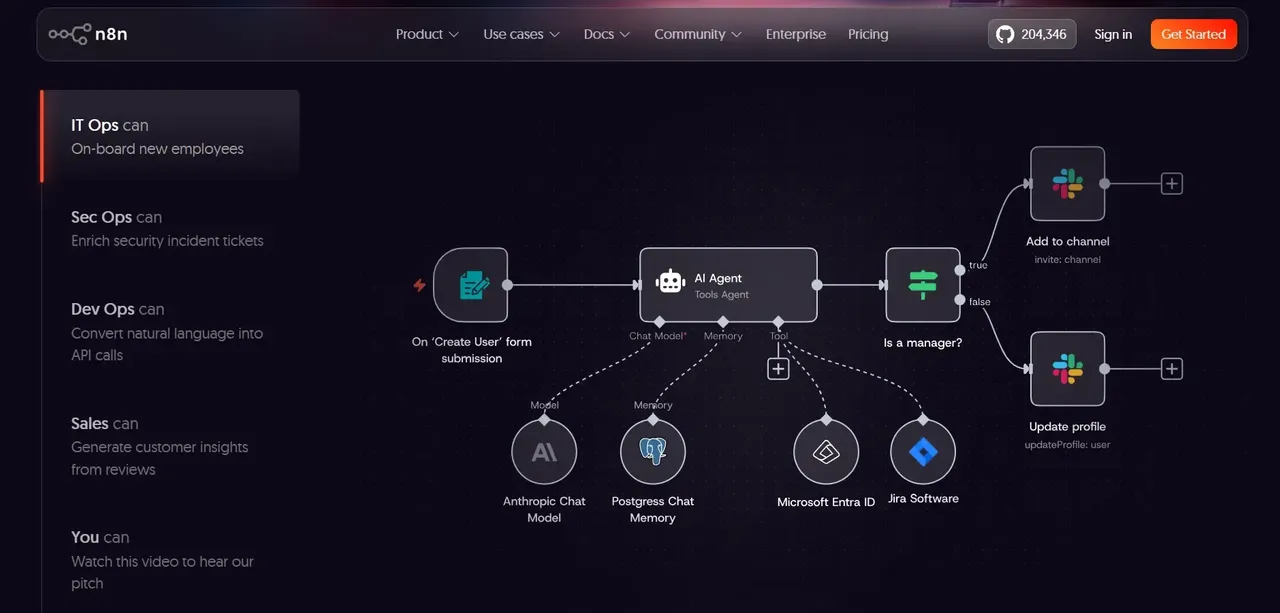
n8n is a workflow automation platform built for technical teams. It uses a node-based visual editor where each node represents an action, a trigger, or a transformation. Unlike connector-first tools, n8n lets you write JavaScript or Python directly inside a workflow, call arbitrary APIs, and chain complex logic without hitting a ceiling imposed by a no-code abstraction layer.
According to a 2026 comparison, n8n offers 400+ native integrations, which is a fraction of Zapier's breadth. The trade-off is depth over breadth: where Zapier gives you a pre-built connector, n8n gives you the HTTP request node and the code node to build whatever the connector does not cover.
N8n's Fair-Code Licensing Model (Not Open Source)
n8n uses what it calls a "fair-code" license, specifically the Sustainable Use License for its core product. This is not the same as open source. You can view the source code, self-host it, and modify it for internal use, but you cannot offer n8n as a managed service to third parties without a commercial agreement. The distinction matters if you are evaluating it for a product you intend to resell or white-label.
For most operators, the practical implication is straightforward: you can run n8n on your own infrastructure at no licensing cost, with full access to the codebase. The enterprise edition (labeled .ee.) adds features like SSO, audit logs, and advanced user management behind a paid license.
Self-Hosting vs n8n Cloud: What You Need to Know
n8n gives you two deployment paths. Self-hosted means you run the application on your own server or cloud infrastructure. You manage uptime, updates, and backups. The core product is free to run this way, and you own the execution environment entirely. This is the path most compliance-sensitive teams and cost-conscious engineering teams choose.
n8n Cloud is the managed SaaS version. You get a hosted instance without infrastructure overhead, but you are back in a vendor-managed environment with cloud pricing. For teams without DevOps capacity, this is a reasonable middle ground, though it removes the data-residency advantage that self-hosting provides.
What Is Zapier? A Quick Overview for Non-Technical Teams
Zapier is a no-code automation platform designed so that a marketing manager or operations coordinator can build a working integration in under an hour without touching a line of code. Its core model is the "Zap": a trigger event in one app kicks off one or more actions in another. The interface is form-based and guided, which means the learning curve is genuinely low.
As noted in a 2026 analysis, Zapier remains the dominant choice for broad SaaS connectivity and business-user-friendly automation. Its strength is the sheer number of pre-built connectors and the speed at which someone with no technical background can get something working.
How Zapier's Task-Based Pricing Works
Every action that runs inside a Zap consumes a task. If your Zap has three steps and it runs 1,000 times in a month, that is 3,000 tasks consumed. Your plan's task limit determines how much automation you can run before you hit an overage or need to upgrade.
This model is intuitive at low volumes. It becomes a structural cost problem as workflows grow in steps or frequency. A multi-step workflow run at high volume can exhaust a plan's task allocation quickly, and the next pricing tier is rarely a small jump. A 2026 comparison points to this escalation pattern as one of the reasons technical teams start evaluating alternatives.
Zapier's App Marketplace: Thousands of Integrations Explained
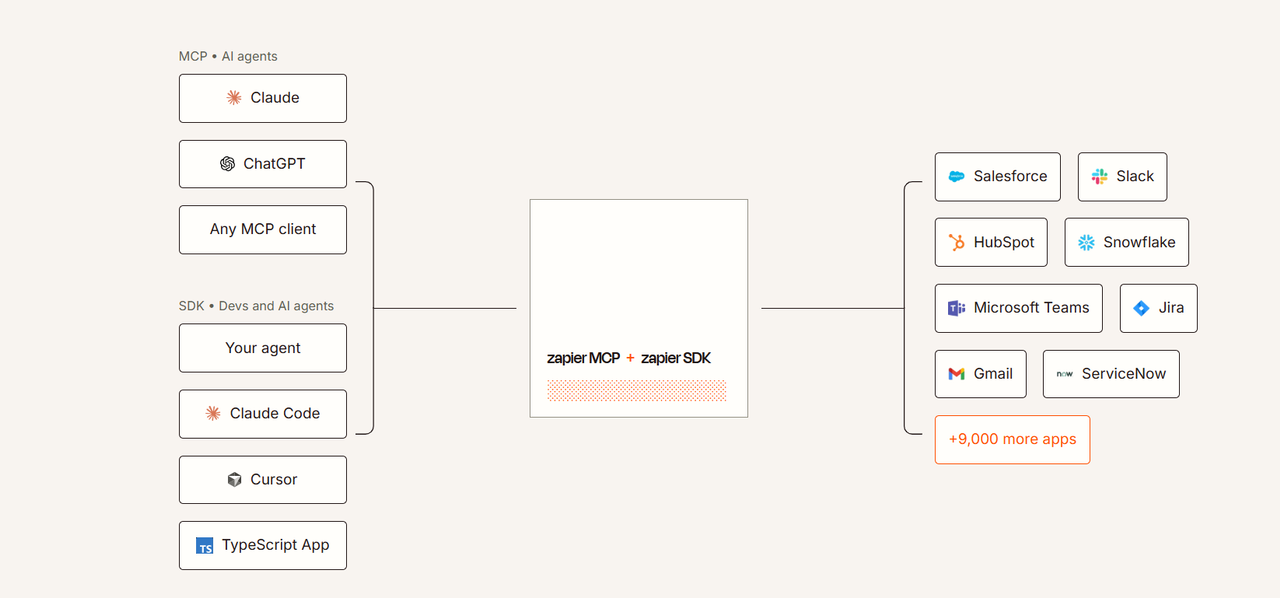
Zapier's connector marketplace covers thousands of pre-built, maintained integrations spanning virtually every SaaS category: CRM, marketing, finance, HR, project management, and more. For business users without a technical background, this breadth is the product. You search for your app, it is almost certainly there, and you configure the connection through a guided form.
The limitation is that these connectors expose only what the integration team has built. If the app's API supports a feature that the Zapier connector does not surface, you cannot access it without workarounds. For standard use cases, this rarely matters. For custom or edge-case workflows, it becomes a ceiling.
Pricing Compared: n8n vs Zapier Cost Breakdown
The pricing models for these two tools are structurally different, and that difference compounds at scale. Zapier charges per task consumed. n8n charges per workflow execution (on cloud) or nothing at all (on self-hosted). For simple, low-volume automations, Zapier's model is predictable and fair. For high-volume or multi-step workflows, the economics shift significantly toward n8n.
A 2026 cost analysis illustrates the divergence: for a multi-step workflow run thousands of times per month, n8n's execution-based model can be substantially cheaper than Zapier's per-task model. The exact savings depend on workflow complexity and volume, but the directional advantage for high-frequency, multi-step automation is consistent across comparisons.
N8n Pricing: Self-Hosted Free Tier vs Cloud vs Paid Enterprise (.ee.) Features
Because official n8n pricing figures were not available from verified vendor sources at time of writing, the following describes the model qualitatively rather than with specific dollar amounts.
Self-hosted (community edition): Free to run. You pay for your own infrastructure (a small VPS is sufficient for most teams). No per-execution fees. No seat limits imposed by n8n. This is the path that makes n8n genuinely cost-competitive for high-volume workflows.
n8n Cloud: A managed hosted version with tiered plans based on workflow executions per month. Pricing scales with usage volume. For teams that want managed infrastructure without self-hosting complexity, this is the middle option.
Enterprise (.ee.) edition: Adds SSO, advanced RBAC, audit logging, and dedicated support. Priced on a per-company basis. Aimed at larger organizations with compliance and governance requirements.
The key structural point: n8n does not charge per task within a workflow. A 10-step workflow counts as one execution, not 10 consumed units. That distinction is what drives the cost advantage at volume.
Zapier Pricing: Where Costs Escalate at Volume
Zapier's pricing is task-based and tiered by plan. Because official Zapier pricing figures were not available from a verified vendor source at time of writing, specific dollar amounts are not stated here. The structural pattern, however, is well-documented across multiple 2025 and 2026 analyses.
The free tier covers a limited number of tasks per month and restricts multi-step Zaps. Paid plans unlock multi-step workflows and increase task limits, but each step in a Zap consumes a separate task. As multiple comparisons note, this means a five-step Zap running 2,000 times per month consumes 10,000 tasks, not 2,000. Teams that build complex workflows or run high-frequency automations hit plan ceilings faster than the task count suggests.
Ease of Use: Building Your First Workflow in n8n vs Zapier
Zapier wins on first-run experience. The guided setup, the form-based configuration, and the plain-language descriptions of triggers and actions mean a non-technical user can build a working Zap in minutes. There is no environment to configure, no server to provision, and no code required at any point. For an operations manager who needs to connect a form tool to a CRM, Zapier is the right tool precisely because it removes all friction.
n8n's canvas-based editor is more powerful and more demanding. You drag nodes onto a canvas, connect them, and configure each one. The interface is visual, but it assumes you understand what an API response looks like, what JSON is, and how to read an error message. For a developer or a technical ops lead, this is not a barrier. For someone building their very first automation with no coding background, it is a real learning curve.
The honest framing: if your team has no one who can read a JSON payload, n8n will frustrate you. If your team has even one person comfortable with APIs, n8n's depth becomes an asset rather than an obstacle.
Integrations and Connectors: Which Tool Connects to More Apps?
On raw connector count, Zapier is not close to n8n. n8n's native node library, put at 400+ integrations by a 2026 comparison, is a fraction of Zapier's much larger connector marketplace. If your workflow depends on a niche SaaS tool, Zapier probably already has a pre-built connector for it.
The counterargument is the HTTP request node. In n8n, any app with a REST API can be connected through a generic HTTP node, even if n8n has no native integration for it. This means n8n's effective integration ceiling is closer to "any app with an API" than the 400-node count implies. The trade-off is that you have to configure the request yourself rather than filling out a guided form.
For standard SaaS stacks (CRM, email, project management, Slack, Google Workspace), both tools cover the ground. The gap opens when you need a connector for a specialized vertical tool or an internal system. Zapier will usually already have the pre-built connector. n8n gives you the tools to build exactly what you need instead.
Advanced Logic and Customization: Where n8n Pulls Ahead
This is where the comparison stops being close. n8n supports native JavaScript and Python execution inside workflows, conditional branching with multiple paths, loop nodes, sub-workflows, error-handling branches, and direct API calls with full control over headers, authentication, and response parsing. You can build an AI-agent pipeline that calls a language model, parses the output, routes based on the result, and writes to a database, all inside a single workflow.
As a 2026 analysis notes, n8n is increasingly aligned with AI-native workflow patterns, where the automation is not just connecting two apps but orchestrating multi-step reasoning and action chains. Zapier has added AI features, but its architecture is optimized for linear, connector-based flows rather than complex branching and code execution.
Zapier's Paths feature allows conditional logic, and its Formatter tool handles basic data transformations. For most business-user workflows, these are sufficient. For workflows that require custom data manipulation, retry logic on failure, or dynamic routing based on API responses, n8n's code-first approach handles cases that Zapier's no-code model cannot comfortably reach.
Reliability, Error Handling, and Observability
Zapier handles reliability at the infrastructure level: it runs on managed cloud infrastructure, maintains uptime, and sends email notifications when a Zap fails. For most users, this is enough. The failure notification tells you something broke; you go fix the trigger or the action configuration.
n8n gives you more control over what happens when something fails. You can configure error-handling branches that trigger a separate workflow on failure, set retry logic, and inspect the exact input and output of every node in a failed execution. This level of observability matters when automation is running business-critical processes rather than convenience workflows.
The self-hosted trade-off is that you own the uptime. If your server goes down, your workflows stop. Teams running n8n in production typically deploy it on a reliable cloud provider with monitoring in place. That is an operational responsibility Zapier's managed infrastructure removes entirely.
Security and Data Privacy: Self-Hosting n8n vs Zapier's Cloud
When you run a Zap, your data passes through Zapier's servers. For most SaaS-to-SaaS automations, this is an acceptable trade-off. For workflows that handle sensitive customer data, financial records, healthcare information, or anything subject to data-residency requirements, routing that data through a third-party cloud introduces compliance considerations worth examining carefully.
Self-hosted n8n keeps data inside your own infrastructure. The workflow executes on your server, and no payload is transmitted to n8n's systems. For compliance-sensitive teams, this is the primary reason to choose n8n over any cloud-based automation platform. As multiple 2026 analyses note, data control is one of the most frequently cited reasons technical teams migrate from Zapier to self-hosted n8n.
n8n Cloud, like Zapier, is a managed environment where your data passes through the vendor's infrastructure. If data residency is the deciding factor, self-hosted n8n is the relevant comparison, not n8n Cloud.
N8n vs Zapier: Which Should You Choose?
The right answer depends on who is building the workflows, how complex they need to be, and how much volume you are running. These are not interchangeable tools with the same buyer. They serve different automation tiers, and the cost and capability gap between them grows as your requirements get more demanding.
Choose n8n If...
- Your team includes at least one person comfortable with APIs, JSON, and basic scripting
- You are running high-volume workflows where per-task pricing creates a meaningful cost burden
- You need self-hosting for data residency, compliance, or security reasons
- Your workflows require custom logic, code execution, AI-agent chaining, or complex branching
- You want to own your automation infrastructure rather than rent it from a vendor
Choose Zapier If...
- Your team is non-technical and needs to build automations without developer involvement
- Your workflows are relatively simple: trigger in one app, action in another, maybe a filter
- You need a connector for a niche SaaS tool and do not want to build the integration yourself
- Managed infrastructure and zero operational overhead are priorities
- Your task volume is low enough that per-task pricing stays predictable
If You Need Genuinely Open Source Instead: Activepieces
If your requirement is a true open-source license (not fair-code), Activepieces is worth evaluating. It is MIT-licensed, self-hostable, and designed to be more accessible to non-technical users than n8n while still offering self-hosting and code-level customization. It has a smaller connector library than either n8n or Zapier, but for teams where the open-source license is a hard requirement rather than a preference, it is the most relevant alternative in the category.
FAQ
Is n8n really free to use?
Self-hosted n8n is free to run under its fair-code license for internal use. You pay for your own server infrastructure, which for most teams is a small monthly cost on a cloud provider. The enterprise edition (.ee.) adds features like SSO and advanced audit logging behind a paid license, but the core product running on your own infrastructure carries no per-seat or per-execution fee from n8n. n8n Cloud, the managed hosted version, is a paid service with tiered pricing based on execution volume.
Can non-developers use n8n, or is it only for engineers?
Non-developers can use n8n's visual canvas to build basic workflows, but the tool assumes a level of technical comfort that Zapier does not. Understanding JSON responses, configuring API authentication, and reading error logs are practical requirements for building anything beyond simple node-to-node connections. Teams without any technical staff will find n8n frustrating. Teams with even one technically capable person can use n8n effectively, with that person handling the complex configurations while others manage simpler workflows.
How does Zapier's task-based pricing affect costs at scale?
Each action step in a Zap consumes one task. A five-step Zap running 2,000 times per month consumes 10,000 tasks, not 2,000. As multiple 2026 analyses document, this multiplication effect means teams building complex or high-frequency workflows hit plan ceilings faster than expected. Upgrading to the next tier is rarely a small incremental cost, and the pattern repeats as volume grows. For low-volume, simple automations, the model is predictable. For high-volume or multi-step workflows, it becomes a structural cost problem.
Does n8n support as many app integrations as Zapier?
By native connector count, no. n8n's native node library, put at 400+ integrations by a 2026 comparison, is a fraction of Zapier's much larger connector marketplace. However, n8n's HTTP request node allows connection to any app with a REST API, which extends its practical reach well beyond the native node count. For standard SaaS tools, both platforms cover the common ground. For niche or specialized tools, Zapier will usually already have a pre-built connector, while n8n requires you to configure the API call yourself.
Is it safe to run sensitive business data through Zapier?
Zapier is a cloud-managed platform, which means data processed by your Zaps passes through Zapier's infrastructure. For most standard business automations, this is an acceptable arrangement. For workflows handling sensitive customer data, financial records, or information subject to data-residency regulations, routing payloads through a third-party cloud warrants careful review of Zapier's data processing agreements and compliance certifications. Self-hosted n8n is the alternative most commonly chosen by compliance-sensitive teams, because workflow execution stays entirely within your own infrastructure and no data is transmitted to the vendor.
Can I migrate my Zapier workflows to n8n?
There is no automated one-click migration tool between the two platforms. Migrating requires rebuilding your workflows in n8n's canvas, mapping your Zapier triggers and actions to equivalent n8n nodes, and reconfiguring your credentials and authentication. For simple linear workflows, this is a manageable process. For complex multi-step Zaps with filters and conditional logic, the rebuild takes more time but also gives you the opportunity to restructure workflows to take advantage of n8n's more powerful branching and code capabilities. Teams that have made the switch typically start by migrating their highest-cost or most complex workflows first, where the economics of n8n's execution-based model deliver the clearest return.